





The holiday season calls for beautiful decorations, and that includes your digital space! Instead of searching for traditional images on search engines, YouCam Online Editor offers a unique experience with its AI-powered image generator. With this tool, users can create aesthetic Christmas wallpapers and Christmas background images that are personalized, creative, and entirely unique.

▲ Create your personalized Christmas wallpaper.
Here’s everything you need to know to get started, plus a few festive prompt ideas to bring your winter visions to life!
Why Use YouCam Online Editor for Christmas Wallpapers?
The AI-driven text-to-image feature in YouCam Online Editor enables you to create exactly the Christmas wallpaper you envision. Rather than relying on generic search results, you can input specific details and watch as this innovative tool brings them to life in stunning holiday images. Here are some advantages of using YouCam’s AI generator:
- Personalized Creations: Each image can be tailored to your tastes. Want a “cozy Christmas morning scene”? Just type it in, and the editor will create it for you!
- Time-Efficient: Instead of sifting through countless search engine results, generate the exact image you have in mind in just seconds.
- Unique Styles: Avoid boring, overused stock photos. YouCam’s AI can produce wallpapers that match your unique vision and bring a refreshing aesthetic to your devices.
With these features, YouCam makes decorating your digital space with festive flair both easy and enjoyable.
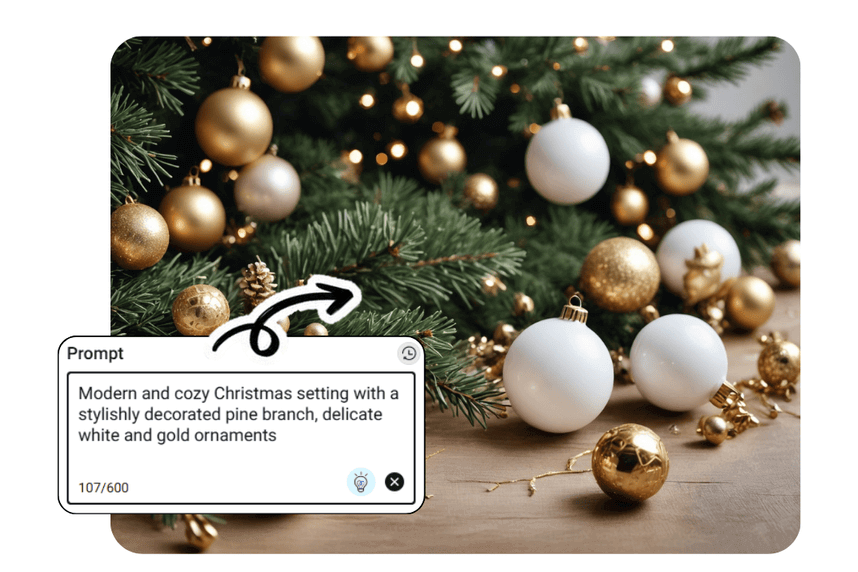
How to Use YouCam’s Text-to-Image Generator
Using the image generator in YouCam Online Editor is simple:
- Visit YouCam Online Editor.
- Access the AI text-to-image feature.
- Type in a description of the image you want (see prompt ideas below!) and pick a style.
- Click generate and watch your personalized Christmas wallpaper appear!
Now, let’s dive into some example prompts you can use to create festive, high-quality wallpapers perfect for the holiday season.
Example Prompts for Christmas Wallpaper and Background Images
These prompts showcase the versatility of the YouCam image generator and provide examples of the type of Christmas-inspired wallpapers you can create:
Christmas Village Backgrounds

▲ Prompt: "Vintage Christmas morning scene with snow-covered pine trees and warm lights" | Style: Anime
Christmas Backgrounds with Aesthetic Ornaments

▲ Prompt: "Elegant gold and white Christmas ornaments with delicate snowflakes falling" | Style: Realistic
Christmas Tree as Background Image

▲ Prompt: "Aesthetic minimalist Christmas tree with fairy lights against a soft beige background" | Style: Realistic
Simple & Cozy Christmas Wallpaper

▲ Prompt: "Warm fireplace with stockings, Christmas gifts, and a softly glowing Christmas tree" | Style: Poly Art
Christmas Wallpaper with Gingerbread Man

▲ Prompt: "Christmas-themed flat lay with gingerbread cookies, pine branches, and cinnamon sticks on white marble" | Style: Realistic
10 Creative Christmas Prompts to Try Out Yourself
Here are some additional creative ideas to help you design even more captivating Christmas wallpapers and backgrounds. Use these prompts to create elegant, festive, and aesthetically pleasing images:
- Snowy Christmas village with twinkling lights and a starry night sky
- Cozy hot chocolate with marshmallows, candy canes, and Christmas lights
- Golden reindeer with sparkly garlands and silver snowflakes on a deep blue background
- Minimalist Christmas wreath with holly berries, pine cones, and eucalyptus on white
- Christmas Eve cityscape with decorated street lamps, snow, and vintage cars
- Cute Christmas cookies arranged in a heart shape with sprinkles and powdered sugar
- Frosty winter forest with fairy lights and a glowing full moon
- Elegant table setting with Christmas candles, silverware, and red berries on linen
- Christmas morning living room scene with a decorated tree, wrapped gifts, and a window showing snow
- Delicate snowflakes on a gradient background of icy blue and lavender
Why You Should Try YouCam’s Christmas Wallpaper Generator
Using YouCam for your holiday wallpapers lets you control every aspect of the image while saving time and energy. Instead of scrolling through repetitive options online, you can type out a quick prompt and enjoy a one-of-a-kind result. Plus, with the variety of creative possibilities, you’ll be able to surprise friends, family, or colleagues with a wallpaper that reflects your unique holiday spirit.
So, this Christmas, skip the traditional search and try YouCam Online Editor’s text-to-image tool for all your festive wallpaper needs. With just a few words, you can bring your ideal holiday scene to life and decorate your screens with custom Christmas magic.


