


 Download without watermarkAccess to AI Photo Editing ToolsUnused credits roll over






AI Image Replace: Generative Fill for Photos
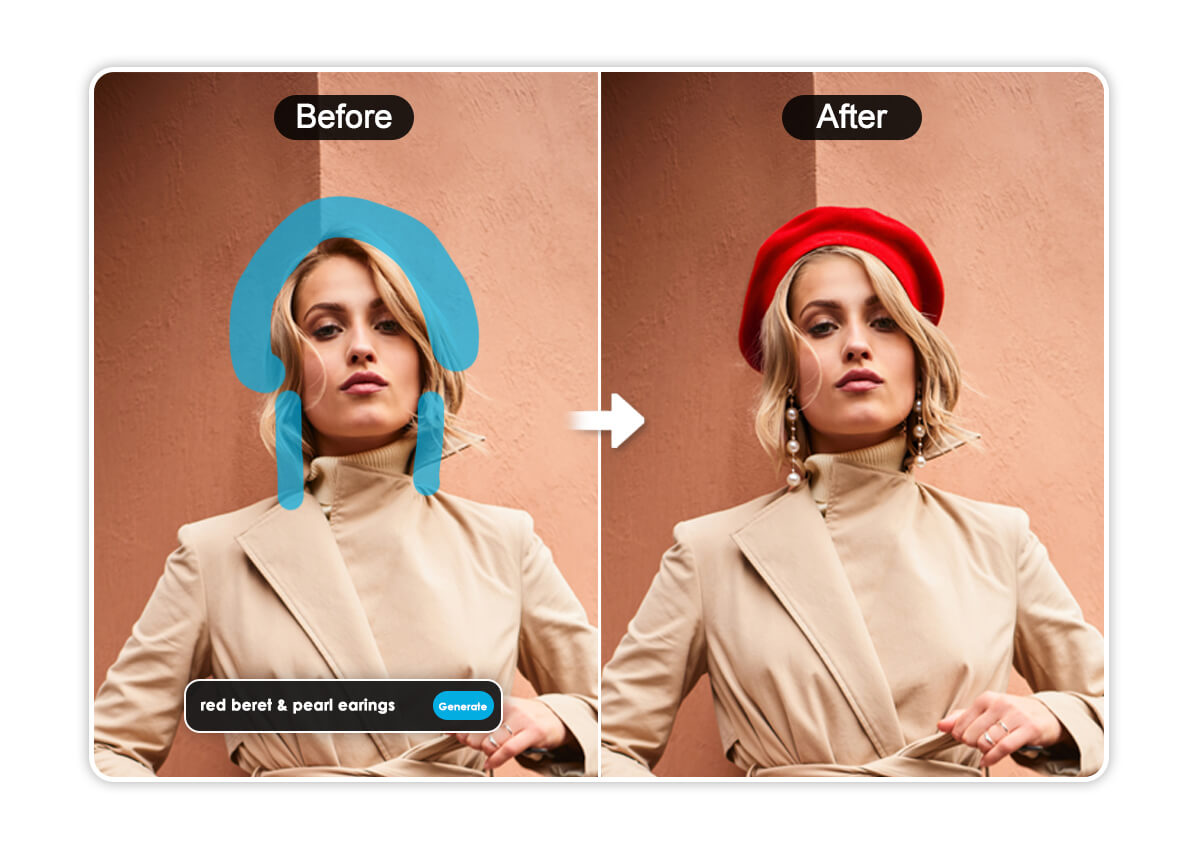
Move beyond simple editing. Use AI to replace outfits, change up backgrounds, or swap objects with simple text prompts. Just brush the area and watch your imagination come to life.







How to Replace Objects in a Photo with AI

Upload Your Photo
Choose an image from your device. Clear lighting and defined objects work best for a seamless blend of your new generative elements.


Brush Area or Object
Use the Brush to highlight the specific object or area you wish to transform.
Pro Tip: For the most realistic results, brush slightly outside the edges of the object to give the AI enough "context" to blend the new textures.

Enter a Text Prompt
In the prompt box, describe exactly what you want to see.
Pro Tip: You can also use prompts to change styles. such as “Change cotton shirt to a black leather jacket”

Click "Generate" to Start
Click "Generate," and watch as the AI replaces your selection with a brand-new, realistically rendered object.
Infinite Creative Possibilities For Your Photos with AI Replace
Swap Objects Effortlessly with Prompts
Ever wished you could just wave a wand and change something in your photo? Now you can. Our AI Replacer understands exactly what you want. Just highlight an object, type in your replacement, and watch it transform instantly.
Pro-Level Edits Without the Manual Work
Forget spending hours with complicated editing software. Our technology automatically matches the lighting, shadows, and perspective of your original shot, making every replacement look like it belongs there.

Total Creative Control at Your Fingertips
Use our intuitive generative fill to add objects that weren't there, change backgrounds, or experiment with entirely new styles. From a simple "add a birthday cake" to "replace with a bouquet of roses," your imagination is the only limit.

See How Some Of Our Users Are Using YouCam's AI Replace
"The best tool for funny edits."
My friends and I use this to make create the most unhinge photos. I once swapped my friend's birthday cake for a giant burger. The AI is so smart it even kept the candles in the right place. We couldn't stop laughing!
– Chris W., Content Creator
“So much easier than Photoshop.”
The generative inpainting is surprisingly smart. I can swap a boring background for a mountain range in seconds. The lighting and shadows match perfectly every time.
– Sarah L., Hobby Photographer
“Saved My Product Launch.”
I needed my product to look 'festive' for a holiday sale. I just used AI Replace to add a few seasonal props to my existing shots. Saved me a ton of money on a new photoshoot!
– Jordan M., Etsy Shop Owner
Everything You Need to Know About AI Replace
What is AI Generative Fill and how does it work?
AI Generative Fill (also known as AI Replace) is a technology that allows you to select an area of a photo and transform it using text prompts. It uses advanced AI inpainting to analyze the surrounding pixels, lighting, and shadows, ensuring that the new object you generate blends perfectly with the original image.
What is the difference between AI Replace and AI Object Removal?
While AI Object Removal is used to erase unwanted items and fill the background naturally, AI Replace is a creative tool used to swap, add, or transform elements. Use AI Replace when you want to change an object into something else (like turning a chair into a throne) or add something new to a scene.
How do I write the best prompts for AI image replacement?
For the most realistic results, be specific with your descriptions. Instead of typing "cat," try "fluffy ginger tabby cat sitting on a rug." Including details about color, texture, and style helps the AI generate a result that matches your vision more accurately.
Can I use AI to add objects to a photo that weren't there before?
Yes! AI Replace isn't just for swapping existing objects. You can brush over an empty area of your photo and type a prompt to add new elements, such as adding a bouquet of flowers to a table or a pair of sunglasses to a portrait.
Why did my AI-generated image look blurry or unrealistic?
High-quality results depend on the original photo’s resolution and lighting. For the best "seamless" blend, ensure your photo has clear subjects and good lighting. Also, make sure your brush selection covers the entire object you want to replace, including its edges.
Which ai tool makes changing images easy?
YouCam AI Replace is the go-to choice if you want professional results without the hassle. Most competitors require complex settings, but we’ve simplified it to a "brush and type" process. Whether you're on your phone or desktop, it’s designed to be the fastest and most intuitive way to swap objects or outfits in any photo.

Replace Objects Your Phone Directly
Download YouCam AI Pro Now!


