





Looking for a creative way to add a special twist to your pictures? With the YouCam Online Editor AI Hug Generator, you can now create realistic AI Hugging Videos from one single photo.
These touching videos are a unique way to spread love, whether it is a mother-and-son reunion or long-distance couples embracing.
Whether you want to preserve special memories or share a special moment, let us show you how to bring your moments to life with just a few simple steps!
Disclaimer: AI-generated hug animations are for creative and entertainment purposes only. The results are simulated and do not represent real-life physical interactions. Please use this feature respectfully and avoid generating content that could be considered inappropriate or offensive.
Join the Gemini AI Polaroid Craze: Make Yours & Turn It Into a Hugging Video!
Join the Gemini AI Polaroid craze by creating your own personalized snapshot, then bring it to life with YouCam’s AI Image to Video tool.
Simply upload your Polaroid and choose from over 30+ animated templates—whether it’s a warm hug, romantic kiss, or a funny moment with friends. It’s a fun and free way to turn static images into engaging, shareable videos.
Learn more about the Gemini AI Polaroid trend:
- Polaroid Gemini AI: Create Realistic Photo (Prompt Included)
- Gemini Polaroid Trend: How to Make a Picture Look Like a Polaroid
- AI Polaroid Trend: How to Create Celebrity Polaroid Photos with Gemini
How to Make an AI Hug Video From a Photo: Step-by-Step Tutorial
Step 1. Open the YouCam AI Video Generator.

- Available: Online (also have app version available for iOS and Android users in the free YouCam Video app)
Click here to read the tutorial for the free app version.
Step 2. Upload a Photo of 2 People you want to be Hugging Each Other.
Choose an image of two people you’d like to see hugging. This could be friends, family, couples, or even your favorite celebrity or idol.
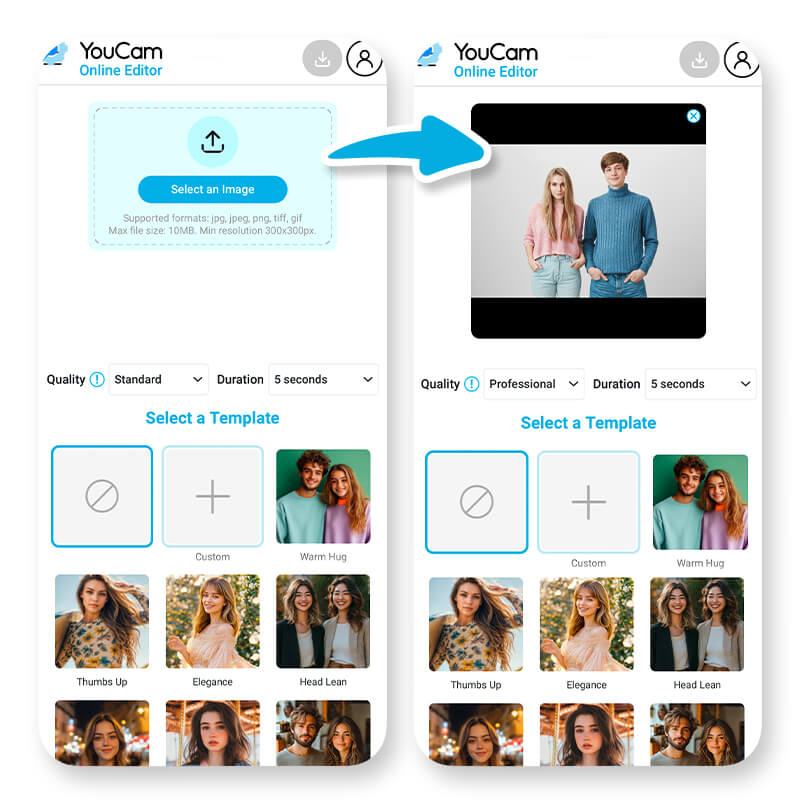
Step 3. Choose the AI Video Template ‘Warm Hug’
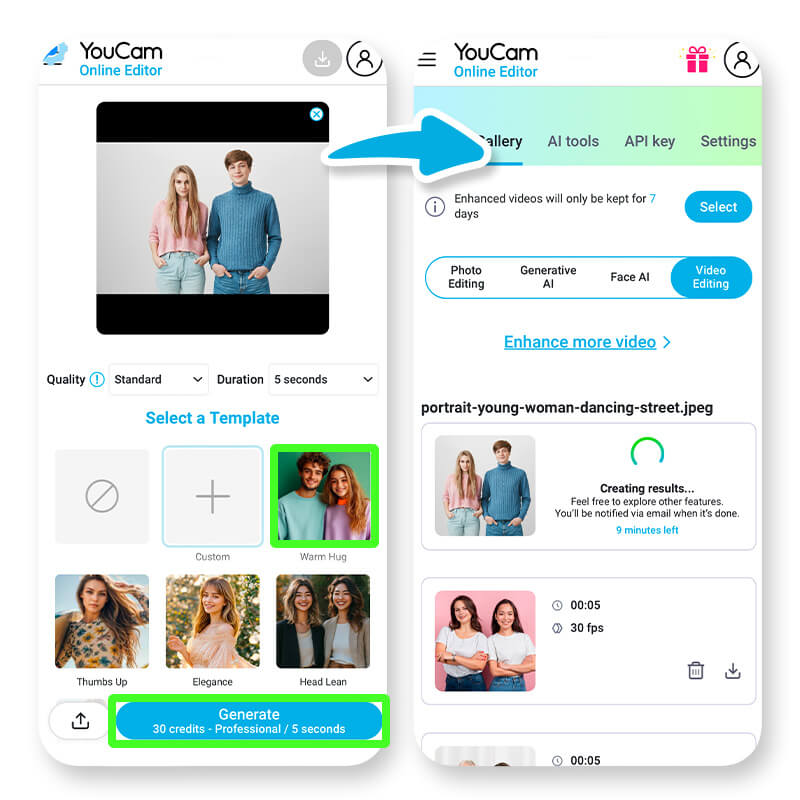
Choose the 'Warm Hug' template, which will automatically turn your photo into a hugging video.
You could also choose "Animate your photo" and enter a text prompt to customize your AI Hug video.
5 AI Hugging Video Prompt Ideas You Can Try
- Hugging Jesus in Heaven: "A serene moment of embracing Jesus in a heavenly, ethereal landscape filled with light and peace."
- Hugging People: "A diverse group of people sharing heartfelt hugs in a bustling city park, capturing the essence of unity and love."
- Hugging My Crush: "A tender, romantic hug with my crush under a starlit sky, surrounded by a dreamy, magical ambiance."
- Hugging Younger Self AI: "An emotional reunion where I hug my younger self, set in a nostalgic, warm-toned room filled with childhood memories."
- Hugging a Pet: "A warm, comforting hug with a beloved pet in a cozy home setting, highlighting the bond between humans and animals."
Step 4. Wait for the AI to Generate Your AI Hug Video
The AI analyzes your photo and creates a seamless, animated hug within a few minutes. Just watch the magic come to life!
Step 5. Save Your AI Hug Video and Share!
Download the finished video and share it with loved ones. It will definitely leave a lasting impression!
6 Highlights: The Best AI Hug Generator
The YouCam AI Video Generator with an advanced image-to-video technology is the best AI Hug Generator, making it the perfect tool for crafting heartfelt videos. Whether you're looking to preserve memories, express emotions, or engage your audience, this AI-powered tool delivers unparalleled results.
- Ease of Use: Just upload your photo, select the AI Hugging Filter, and let the magic happen—no technical skills required!
- Realistic Hug Animations: Experience the warmth of an animated hug with lifelike movements and expressions.
- Personalize Your Video: Add text prompts to your videos and make them more unique.
- High-Quality Results: Powered by advanced AI technology, the YouCam AI Video Generator delivers stunning, professional-looking videos.
- Available for iOS: Mobile users on iPhones can use the YouCam Video app to generate their own AI hugging videos on the go. The app is packed with features like image-to-video, face swap, AI enhancement, and more!
- Perfect for Any Occasion: The YouCam AI Hug Generator fits a variety of purposes, making it the ideal tool for creating heartfelt, shareable videos.
10 AI Hugging Video Ideas
- Create hugging videos that bring old memories to life and celebrate love and friendships with your partner or good, old friends.
- Blend fantasy and reality by creating hugging scenarios with your favorite anime characters in a realistic video,
- Relive precious memories by animating old photos with your family members. The timeless AI Hug Video allows you to treasure family moments, even honoring loved ones who have passed away.
- Create fun scenarios (or even let your delusions come to life) by hugging your favorite celebrities or movie characters.
- Share some wholesome videos with your pet out of your favorite pictures with them.
- Hug your younger self, where your present self gently meets and embraces the child you once were.
- When words fall short after a fight, send a virtual AI hug to heal and reconnect.
- Bring old black-and-white photos to life and create a hugging moment with your mom or dad when they were young. A beautiful tribute to family and legacy.
- Use AI to create a moment you wish had happened, like a hug with someone you lost too soon, or never got to say goodbye to.
- Use old photos of your childhood pet to create an AI moment where you get to hold them again.
Top User Reviews of YouCam AI Hug Video Generator
See what our users say about the AI Hug generator and why it’s their favorite way to create heartwarming videos:
"Such a Sweet Surprise"
I made a short birthday video for my mom with YouCam’s AI Hug effect, and she got so emotional. It felt genuine, natural, and way beyond what I thought an AI Hug video could do. — Emily R., Lifestyle Blogger
"Looks Like a Movie Scene"
I tried the AI Hug video generator on my best friend’s graduation photos, and when she saw it, she literally screamed. It had that cinematic, heartwarming vibe that gave everyone chills. — Daniel W., Freelance Editor
"Perfect for Family Videos"
I added the Tender Hug template from the AI Hug generator to my sister’s wedding video, and people were tearing up. It blended in so naturally that it looked like it was always part of the moment. — Hannah T., Wedding Filmmaker
"Feels Real, Not Cheesy"
You know those hugs in movies that just hit right in the feels? That’s what the AI Hug templates capture. It’s emotional, but in a genuine way — nothing fake or overdone. — Michael K., Visual Storyteller
"Instant Warmth for My Reels"
Whenever I want a wholesome vibe for my reels, I just use the AI Hug effect. My followers always DM me like, “How did you make this AI Hug video feel so real?” — Sophie L., Social Media Creator
Legal and Ethical Guidelines for Using AI Hug Generator
- Respect Privacy: Only use photos of yourself or individuals who have given clear consent. Do not upload or animate images of others without their explicit permission.
- Avoid Misuse: Do not use AI-generated hug videos to deceive, impersonate, or mislead others. Clearly disclose that the content is AI-generated to avoid confusion.
- Comply with Laws: Ensure your use of the AI Hug Generator complies with all applicable laws and regulations, including those related to privacy, copyright, and personal image rights.
- Ethical Use: Use this feature responsibly and with consideration. Avoid creating content that may be interpreted as offensive, inappropriate, emotionally manipulative, or harmful.
- Intellectual Property: Do not use copyrighted or trademarked images without proper authorization. Make sure your animations respect the rights of all individuals and third parties involved.
More AI Video Generating Ideas
- AI Kissing Generator: Create AI Kissing Videos Online Free
- AI Dance Video Generator: Make Your Photo Dance Online Free
- Animate Photo: Make Image Move With AI Photo Animator
- Photo to Video: Convert Images to Videos Online for Free
Online AI Hug Generator: FAQ
Which AI makes people hug?
Simply open the YouCam Online Editor AI Video Generator and upload an image of two people. It can be anyone, whether you want to hug an old friend, a family member, your favorite anime character, or even your idol. Choose the “Warm Hug” option and watch the magic come to life as you hug your favorite celebrity in a realistic AI Hugging Video!
How to use AI to hug someone?
The YouCam Online Editor AI Hug Generator is robust and user-friendly. The AI effortlessly generates videos of two people embracing. Create hugging videos with just one click in minutes. The tool instantly creates realistic, high-quality AI hugging videos.
What is the AI app that makes pictures hug
YouCam Online Editor AI Video Generator uses advanced AI technologies to create stunning AI Hug Videos. Simply upload your photo, and let the AI do the magic. Within a few minutes, you will have a high-quality, dynamic video ready to use.
How to make 2 people hug AI free?
Use the YouCam Online Editor AI Video Generator with an AI Hug feature to create a hugging video. Simply upload any photo of two people, click “Warm Hug”, and let the AI generate the hugging video in a minute.


