


 Download without watermarkAccess to AI Photo Editing ToolsUnused credits roll over





Background Changer: Change Image Background Online
Easily change photo backgrounds with our Background Changer. Simply upload your photo and choose any background color, design, or apply a blur effect!


Replace Photo Background with just one click
Precise background changing enables you to effortlessly:
- Replace a photo background with any image
- Blur a photo background and adjust the intensity
- Change background colors

Add White Background to Professional Photos
Enhance your portrait's professionalism by adding a white background or other colors to your profile pictures.
Explore more: Remove Background, Free Online BG Remover, Photo Background Changer, Best Photo Background Editor


Change Photo Background for Product Images
Captivate customers by elevating your product photos with a vibrant, clear background color that will make them truly stand out.
Explore more: White Background Photo Editor, Remove Background From Signature, Remove Background on Logo


Change Photo Background Color Effortlessly
Change photo background colors easily to swiftly enhance the visual appeal and aesthetics of your images.
Explore more: Passport Photo Maker, Add Beach Background


Remove Photo Backgrounds & Make Backgrounds Transparent
Effortlessly remove the background and replace it with a transparent one, perfect for convenient editing in PNG format.
Explore more: Add Black BG to Photo, Add White BG to Photo, Background Color Changer


How to Change Photo Background Online
The ultimate online enhancement tool provides the convenience of one-click AI background removal and the flexibility to change the photo background.

Upload Your Photo
Upload the photo from which you would like the background changed.
(Supported formats: JPG, JEPG, PNG, TIFF, and GIF)


Auto Remove Background
After uploading, the AI tool will detect and erase the background to make your photo background transparent.

Change Photo Backgrounds
Choose your preferred color and add it as the new background to your photos.

Save Your Photo
Download your photo with a new background color.
Background Changer FAQs
How to change photo background
- Visit YouCam Online Editor on your preferred browser.
- Upload your photo and change the background to your liking.
- You can also adjust the background color or picture and choose whether to blur it or not.
YouCam Online Editor provides simple steps to make it easier for you to get started
How to remove background from picture
- Step.1 : With our YouCam Online Editor, simply upload your photo.
- Step 2 : click a few buttons, and your picture, minus the background drama, is ready to shine.
How to change background on iphone
We've got good news for you! Transforming your iPhone photos is a breeze with YouCam Online Editor. Whether you fancy a tropical beach or a city skyline, our app lets you swap backgrounds seamlessly. Your iPhone, your style, and now, your background. Who knew phone photography could be this much fun?
How to change background color on instagram story
Instagram stories just got a whole lot more colorful! Tired of the same old background hues? With YouCam Online Editor, the world is your color palette. Spice up your stories with vibrant backgrounds that match your mood or your brand. A splash of color here, a pop of brightness there – your Instagram game just leveled up. Get ready to turn heads with your Insta-worthy stories!
Is there a free AI tool to change photo background?
Yes! YouCam Online Editor provides you to get some credits start. You can use our tool to change photo background online with your mobile or computer.
What kinds of images might struggle with background changes
Images featuring detailed or blurry edges, or transparency in the main subject, could face difficulties with automatic background changes.
Where do you store the images that I upload for background changes
Uploaded images are stored on secure servers and are treated with the utmost confidentiality.
Is it feasible to change the background of a photo using my iPhone
YouCam's Change Background feature lets you effortlessly edit images and photos on your iPhone. It's easy to switch up the backgrounds of your iPhone photos – from tropical beaches to urban skylines, our app has you covered. Personalize your phone's photos to reflect your style and enjoy the fun of creative phone photography!
Where can I find copyright-free images for my new background after removing the original one
Your search ends here! Our Online AI Image Generator empowers you to effortlessly craft and personalize copyright-free images, perfect for your background transformation desires. Elevate your visuals smoothly and let your imagination take flight!
How do I make my background transparent?
- Launch YouCam Online Editor's AI Background Changer Tool
- Upload Your Photo – Select any image where you'd like to change the background.
- AI Background Removal – The AI will automatically remove the background, allowing you to replace it with a transparent background or choose new colors or images.
- Preview & Save – Review your image and save it with the new transparent or custom background.
How can I change my background to white?
- Step 1 : Start by uploading your photo to our AI Background Changer Tool.
- Step 2 : The AI will automatically remove the background.
- Step 3 : Select white as your new background.
With these simple steps, you can get an ideal photo in seconds.

YouCam AI Colorize is a free online tool that brings new life to black and white photos. Using advanced AI, it effortlessly transforms old or vintage pictures into vibrant, full-color images with a single click.


YouCam Photo Face Swap is a fun and easy-to-use tool that allows you to seamlessly replace faces in your photos. Whether you want to swap with friends or a favorite celebrity, this AI-powered feature provides instant, high-quality results for endless entertainment.

YouCam Object Remover is an intelligent tool designed to perfectly erase unwanted elements from your photos. It allows you to effortlessly remove distracting objects, people, or text, leaving you with a clean and flawless image.
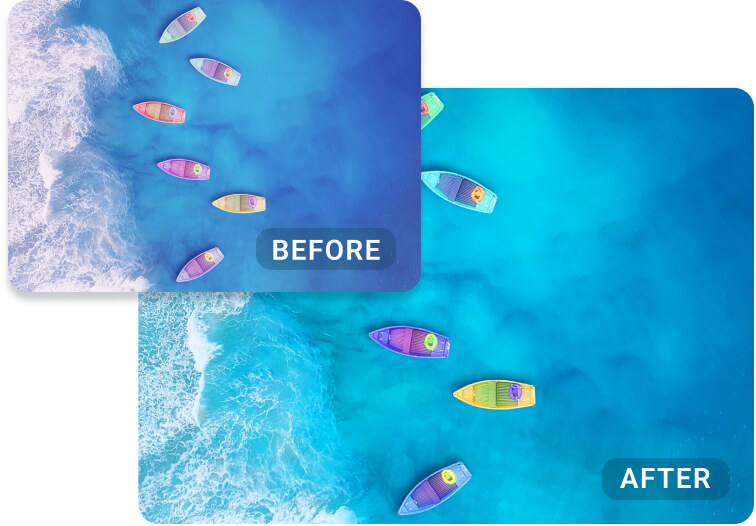
YouCam AI Color Correction is the perfect solution for improving your photo's colors with ease. This tool automatically adjusts exposure, corrects color casts, and enhances overall vibrancy to give your images a professional finish.
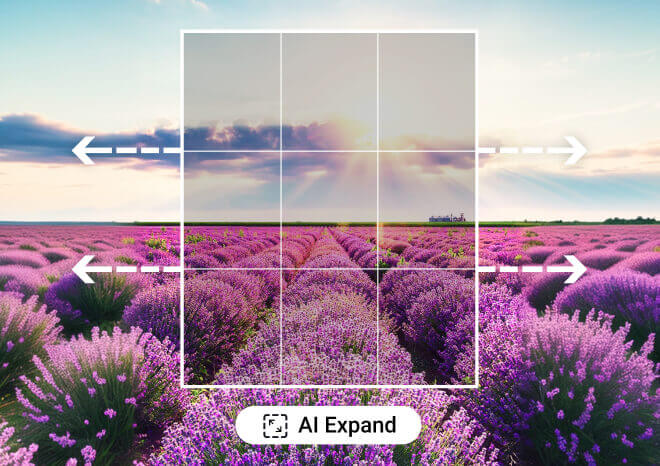
YouCam AI Image Extender is an innovative feature that expands your photo backgrounds to fit any need. This tool uses AI to seamlessly extend images, making them perfect for social media posts, website banners, or any project that requires a custom aspect ratio.

YouCam AI Replace is a powerful tool that transforms your photos by replacing any element you desire. Simply describe what you want to change, and the AI will generate a new image with the requested object or outfit seamlessly integrated.

Enhance Photos With
AI on Your Mobile
Enhance your images into high-quality masterpieces with YouCam app


