


 Unduh tanpa watermarkAkses ke alat Edit Foto AIKredit yang tidak terpakai akan dibawa ke bulan berikutnya





AI Video Enhancer Online: Upscale to 4K & Fix Blurry Videos
Breathe new life into your videos. Turn blurry, low‑res clips into sharp 4K‑ready videos in a few clicks. Unblur, denoise, and upscale your footage with AI, right in your browser!




Why the YouCam Online AI Video Enhancer?
- AI-Powered Upscaling to 4K: Boost low-resolution clips to HD or 4K quality with AI that sharpens fine details, restores clarity, and makes your footage look like it was shot on a professional camera.
- Unblur & Denoise in Seconds: Fix soft, shaky, or grainy videos from your phone, screen recordings, or old archives. The AI enhances every frame automatically — no manual editing required.
- Fast & Easy Online Process: Upload your video, apply AI enhancement, and download a cleaner, sharper result in minutes — no software to install and no editing skills needed.
- Safe & Secure: Your videos are processed with advanced encryption and security, so your footage stays private and protected throughout the enhancement process.

How to Enhance Video Quality Online with AI

Upload Your Video
Click Upload and choose your clip in a common format such as MP4, MOV, or M4V. Shorter videos upload and process faster, so start with the footage you most need to fix.


AI Processing
The AI analyzes every frame to sharpen details, reduce noise, and improve overall resolution automatically, turning blurry or low‑quality clips into clearer, more polished videos.

Preview
Use the preview to compare before and after. Then click "Enhance Video" to process the entire clip with full AI power.

Export
Download your enhanced video at the improved resolution, with options up to 4K depending on your plan.
Enhance Any Video for Any Purpose
Restore Old & Low-Quality Footage
Breathe new life into blurry home videos, archived clips, or old recordings. The AI sharpens fine details, removes grain and noise, and upscales resolution so your memories and legacy content look clear and modern, ready to save and share again.
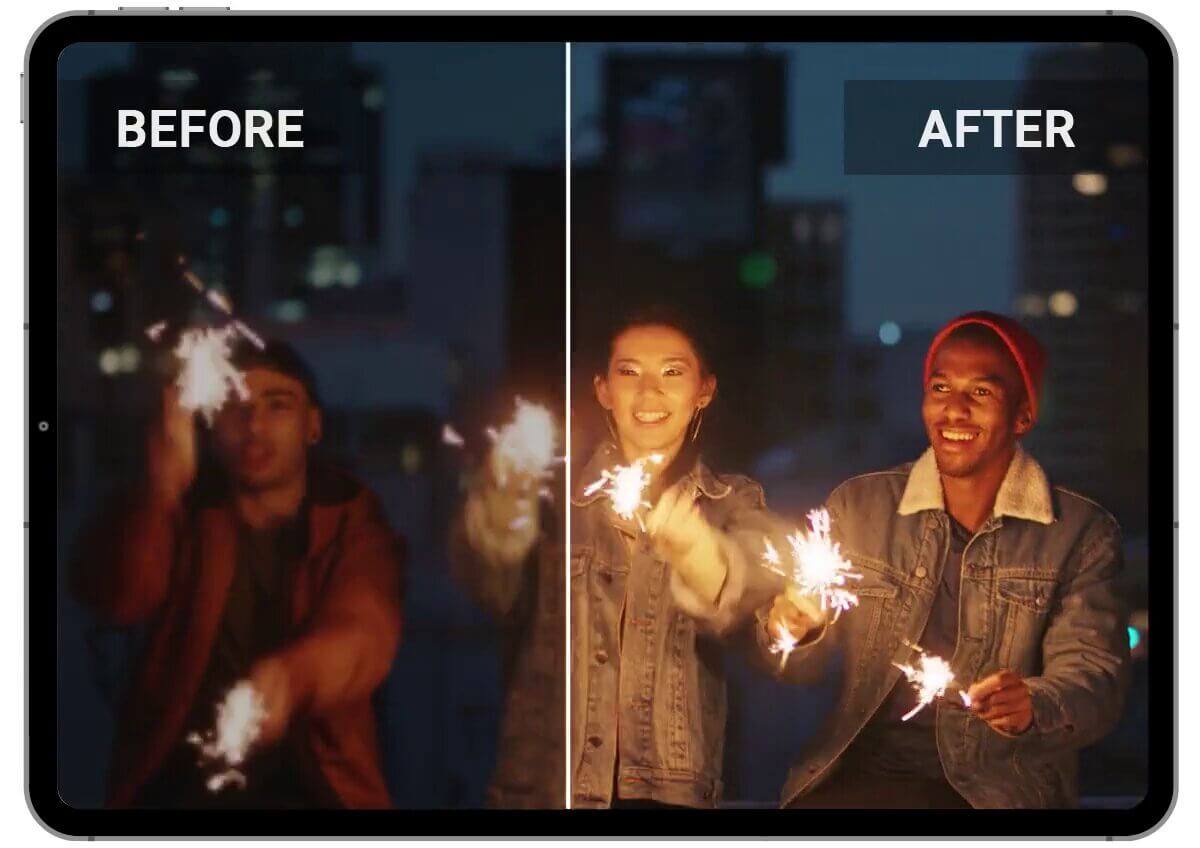
Fix Blurry Social Media Videos
Make your TikToks, Reels, and YouTube Shorts look sharp and professional. Whether your footage came out soft from a fast-moving scene or lost quality after compression, YouCam's AI enhancer restores clarity frame by frame, making your content stand out in any feed.

Upgrade Product & Marketing Videos
Turn low-resolution demos, ads, or brand clips into polished, high-quality assets. Skip the costly reshoot and let AI upscale and sharpen your existing footage to meet modern standards. And, just like that, your visuals look as good as your product.
Trusted by Thousands to Fix and Enhance Their Videos
See how creators, photographers, and businesses are rescuing low-quality footage with YouCam.
“Saved me from re-recording”
I filmed a quick clip for my stories but the lighting was bad and the video came out super grainy. I really didn't want to re-record everything, so I tried this. It cleaned up the noise and made the footage look sharp enough to post. It's way easier than I expected.
– Marcus T.
“My old clips finally look sharp”
I have these old videos of my kids from my first smartphone that look terrible on a big screen. I ran one through the enhancer and was honestly surprised. It’s not 'perfect' magic, but the faces are so much clearer and the grain is mostly gone. It's much easier to watch now.
– Elena R.
"Professional quality in seconds"
We had some footage for a work project that was a bit low-res and looked blurry. I put it through the YouCam enhancer and it sharpened up the details immediately. It looks much more professional now and it was a lot faster than trying to fix it in a complicated video editor.
– Jordan M.
Frequently Asked Questions: Enhancing Videos with AI
What is the difference between AI upscaling and standard video enhancing?
Standard upscaling simply stretches the existing pixels, which often results in a blurry or "blocky" look. YouCam’s AI Video Enhancer uses deep learning to "inpainting" and reconstruct missing details, actually creating new pixels to deliver a true high-definition or 4K result that looks natural.
What is an AI video enhancer?
An AI video enhancer is a tool that uses machine learning to automatically improve video quality. It analyzes each frame to sharpen details, reduce grain and noise, upscale resolution, and fix blurry or low-light footage — without any manual editing.
How do I enhance my video quality online with YouCam?
Upload your video, select your enhancement settings or let the AI detect the best mode, and click Enhance. The AI processes every frame and delivers a sharper, cleaner result you can preview and download. No software installation needed.
Can AI really fix a blurry or out-of-focus video?
AI enhancement works best on footage that is soft, slightly out of focus, or degraded by compression or low resolution. It can significantly sharpen and clarify these videos. Severely out-of-focus footage may see limited improvement, as the AI needs some underlying detail to work with.
Is the YouCam AI Video Enhancer free to use?
New users receive free trial credits to try the AI video enhancer. Ongoing use or higher-resolution exports may require a plan. You can start enhancing without a subscription to test the results first.
Is it safe to upload my personal and private videos?
Absolutely. Your privacy is our priority. All uploaded videos are encrypted and processed through secure servers. We do not store your content longer than necessary for the enhancement process, and your data is never shared with third parties.
Which video formats are supported?
YouCam's AI video enhancer supports common formats including MP4 and MOV. For best results, upload high-quality source footage — avoid heavily compressed files, as starting quality affects the final output.
How do I upscale a video to 4K with YouCam?
How do I upscale a video to 4K with YouCam?
Upload your clip, choose the upscale or 4K enhancement option, and let the AI rebuild missing detail frame by frame. The result is a higher-resolution version of your video that looks sharper and more detailed on modern screens.

Enhance Videos Easily on Your Phone with our App.
Download Now!


